Top 10 Kling AI Alternatives for AI Video (2026)
Compare the top 10 Kling AI alternatives for AI video in 2026, including tools that still use Kling 3.0. Pricing, free tiers and credit rules.

Vance Lim
Technical Writer

Dieser Artikel ist auf Englisch.
By Vance Lim · Updated September 23, 2026
Quick answer: You can leave Kling's app without giving up Kling's model. To keep Kling 3.0, Runway includes it on every paid plan and LTX Studio from its $35 Standard plan; DreamBench also runs it inside finished multi-scene videos. To switch models instead, Google Flow offers Gemini Omni Flash — #1 on the Artificial Analysis text-to-video leaderboard with audio on September 23, 2026 — plus 50 free credits a day, and Hailuo offers MiniMax H3 at native 2K.
Disclosure: DreamBench publishes this guide and is one of the tools listed. Every entry, ours included, notes where the tool falls short. Prices change often, so confirm on each vendor's site before buying.
Searching for Kling AI alternatives usually means one of two things, and they have different answers.
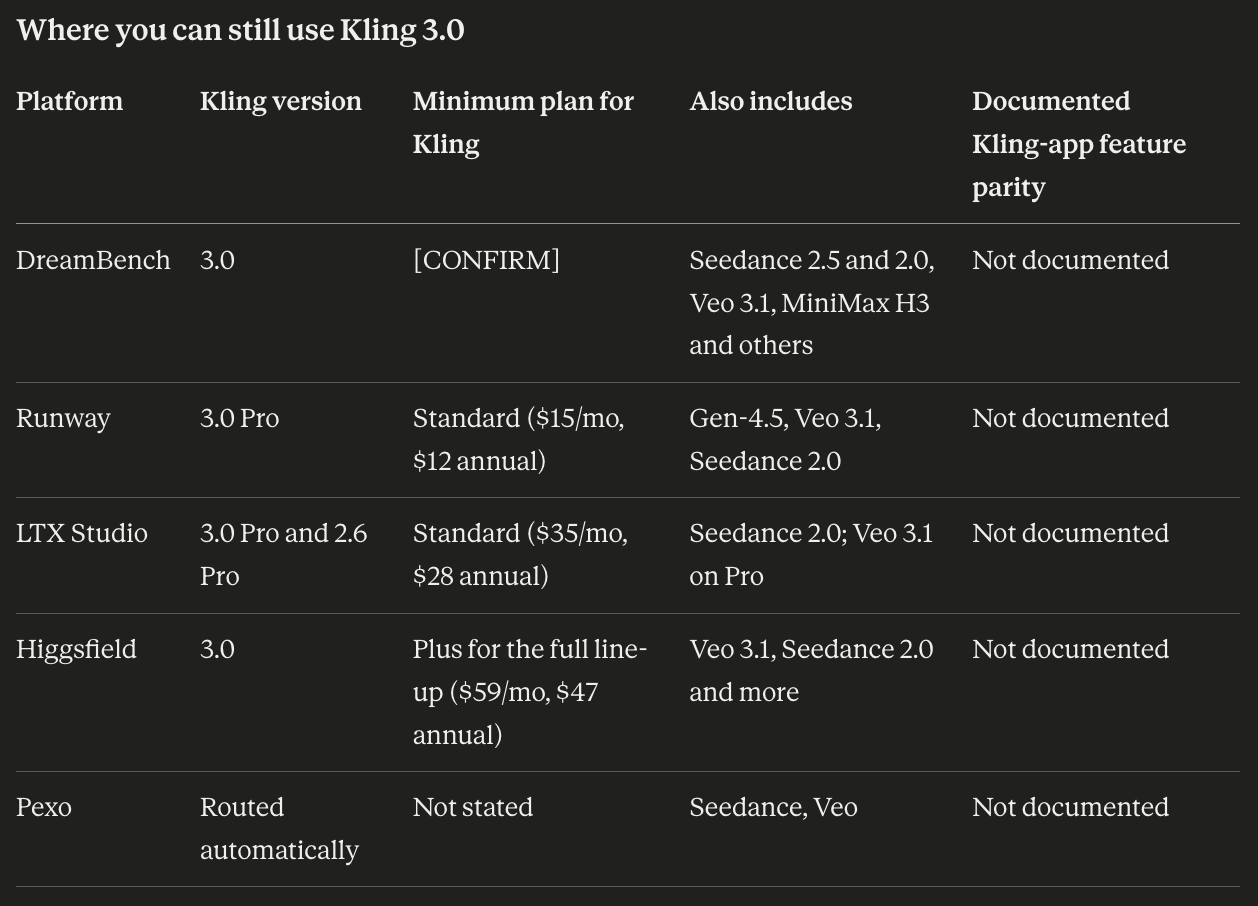
You like Kling 3.0 but not the Kling app — the credit rules, the renewal pricing, or the clip-by-clip workflow. Then you don't need a different model at all. Several platforms run Kling 3.0, and the real questions are which version they offer, what the cheapest plan with Kling costs, and which of Kling's own features come along.
You want a different model. Then compare motion quality, prompt adherence, consistency and cost on the same brief. Kling 3.0 Pro ranked 12th on the Artificial Analysis text-to-video leaderboard with audio when we checked on September 23, 2026, so there are models that blind voters currently prefer.
This guide covers both paths: five platforms where you can keep Kling, and five models to switch to.

Kling AI alternatives at a glance
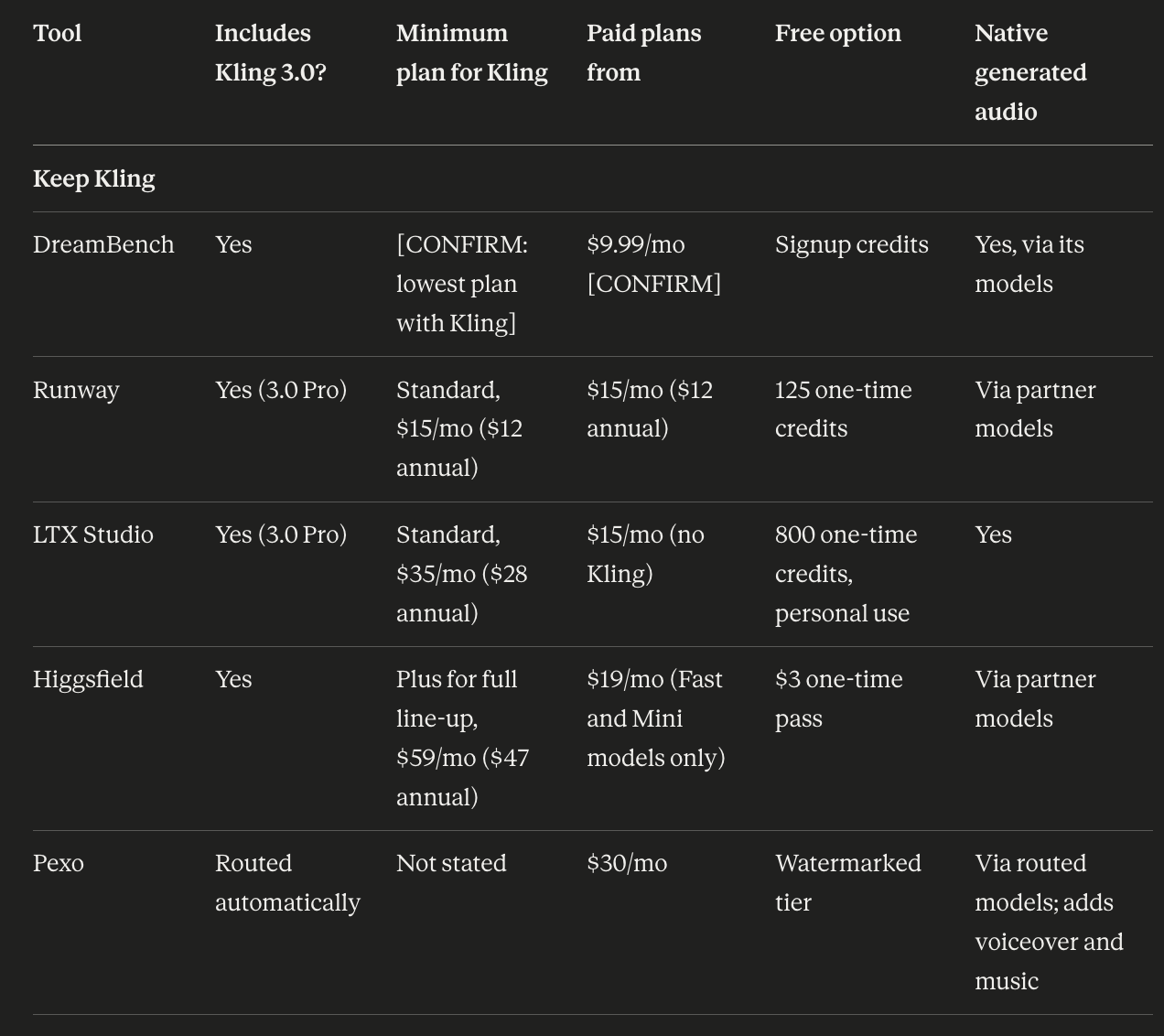
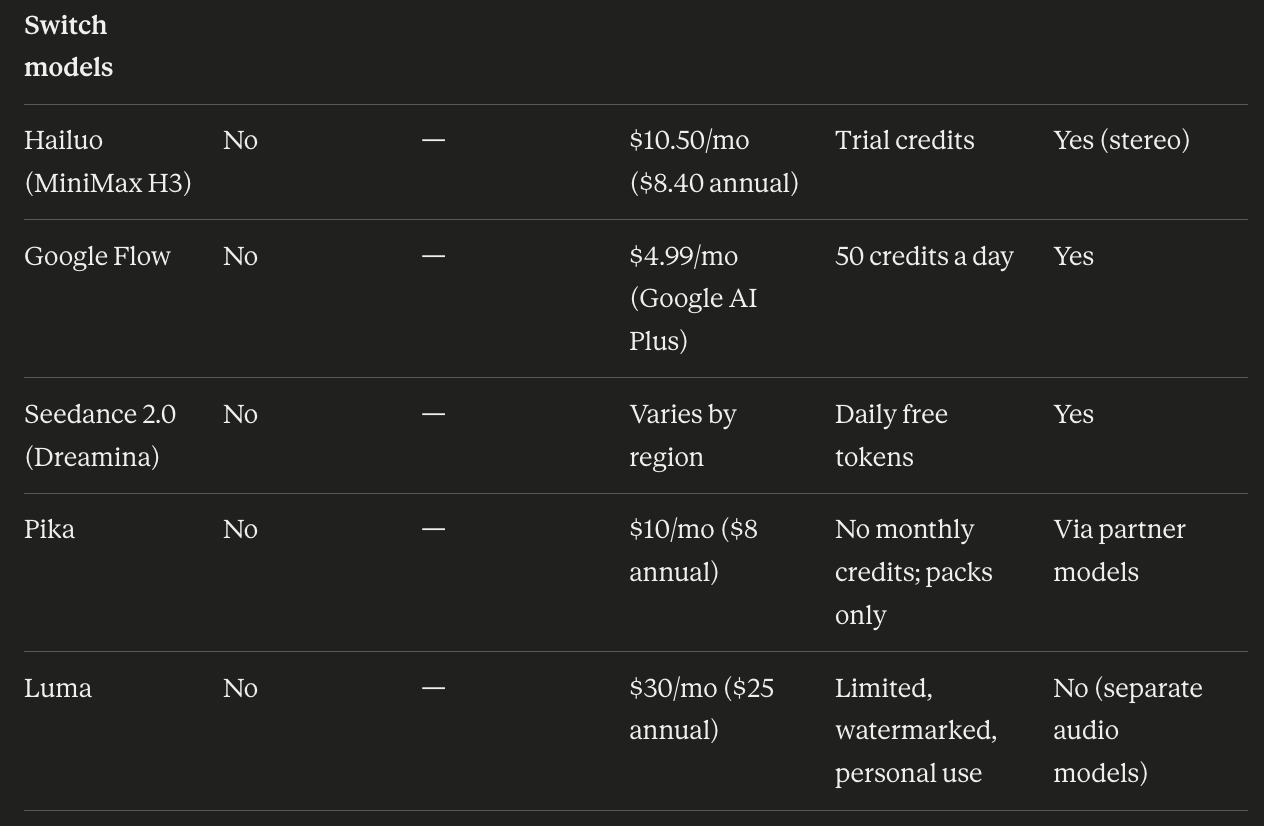
A warning about comparing credits: a credit is worth something different on every platform. Compare cost per finished, usable video on your own brief, never credit totals.
What you'd give up by leaving Kling's app
This is the part most comparisons skip. Running "Kling 3.0" elsewhere gives you the model, not necessarily Kling's own tools. Kling's documentation for VIDEO 3.0 Omni lists:
- Custom Multi-Shot — shot-level control of duration, framing, angle, narrative content and camera movement.
- References — up to seven images, or one 3–10 second video.
- Elements with bound voices — attach a 5–30 second voice sample to a character.
- Native audio combined with element consistency.
- Up to 15 seconds per generation, at 720p or 1080p.
Kling also offers Motion Control for transferring movement from a reference video.
None of the platforms below document full parity with those features. If you rely on one — Motion Control or voice-bound characters especially — test that exact feature on the alternative before you cancel.
Path 1: Keep Kling 3.0, leave the Kling app
Why people leave the app but keep the model
- Plan credits expire 31 days after issue. Purchased credits last two years, but your monthly allowance doesn't carry over.
- Introductory prices renew higher. A September 13, 2026 check found Standard at $6.99 for the first month, then $8.80.
- The free tier shrank. The widely quoted "66 credits a day" is out of date: a July 2026 check found non-subscribers get about 66 credits a month, at 720p, watermarked and for personal use only. Daily bonus credits now go to paying subscribers.
- Billing complaints. In June 2026, CheckThat reported a 1.3 out of 5 Trustpilot rating across 318 reviews and found that billing and subscription practices, rather than video quality, drove most pricing complaints. User reports also say failed generations can still consume credits.
- Clips, not finished videos. Multi-Shot helps, but a longer ad still means generating and assembling many clips.
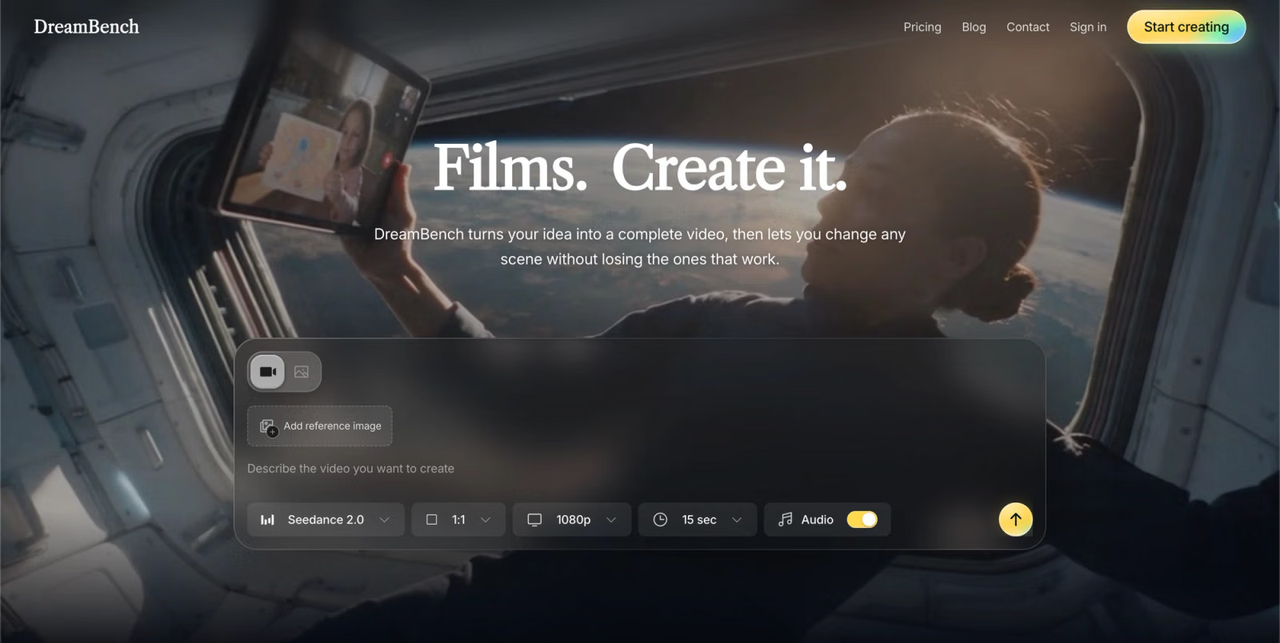
1. DreamBench: best for Kling inside a finished multi-scene video
- Pricing: [CONFIRM current plans] Starter $9.99/mo (750 credits, videos up to 30 s) · Plus $39.99/mo (3,000 credits, up to 2 min) · Ultra $99.99/mo (7,500 credits, up to 5 min) · Studio $399.99/mo (30,000 credits)
- Kling access: Kling 3.0, one of 12 models · minimum plan
- Credit rules: Calendar-month expiry
Compared with Kling AI: instead of generating clips one at a time, you write one prompt. DreamBench's planning agents break it into scenes, route motion-heavy scenes — sports, vehicles, dance — to Kling 3.0 and other scenes to models such as Seedance or Veo 3.1, quality-check the keyframes, and stitch one finished cut. To change one scene, you reprompt that scene and only those seconds are billed; the rest of the film is reused rather than re-rendered.

Where it falls short: DreamBench doesn't document Kling's Motion Control, voice-bound elements or seven-image references. It's priced for finished videos, not clip volume, so per second of raw footage, Kling's own API is cheaper. It's also far newer and smaller than Kling, with signup credits rather than an ongoing free allowance.
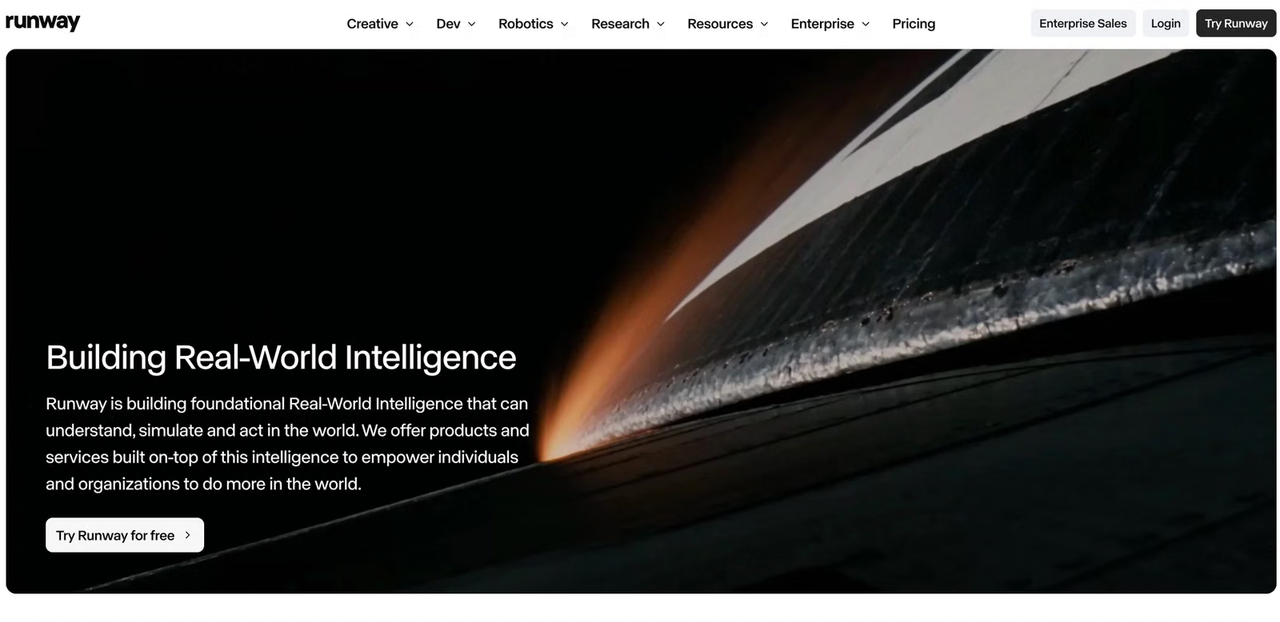
2. Runway: best for Kling plus a full editor
- Pricing: Free (125 one-time credits) · Standard $15/mo or $12 billed annually (625 credits) · Pro $35/mo or $28 annually (2,250) · Max $95/mo or $76 annually (9,500)
- Kling access: Kling 3.0 Pro on every paid plan
- Credit rules: plan credits are forfeited each cycle, except on Max, where up to one month of unused credits rolls over. Purchased credits never expire.
Compared with Kling AI: Runway is the cheapest way to keep Kling 3.0 Pro alongside a serious editing suite — motion brushes, video-to-video edits, camera controls and a timeline — plus Gen-4.5, Veo 3.1 and Seedance 2.0 in the same account.
Where it falls short: entry-plan credits go quickly, and only Max rolls anything over. Kling-specific tools such as Motion Control aren't documented.
3. LTX Studio: best for planning a project around Kling shots
- Pricing: Free (800 one-time credits, personal use, LTX models only) · Lite $15/mo (personal use, LTX models only) · Standard $35/mo or $28 annually (28,000 credits, commercial use) · Pro $125/mo or $100 annually (110,000 credits)
- Kling access: Kling 3.0 Pro and 2.6 Pro from Standard; Veo 3.1 added on Pro
Compared with Kling AI: LTX Studio starts from the script. It breaks a story into scenes and storyboards with reusable characters and locations, then lets you render shots with Kling 3.0 Pro, Seedance 2.0 or LTX's own models. Standard is also where commercial rights begin.
Where it falls short: Free and Lite don't include Kling at all, and are personal-use only. Veo 3.1 needs the $125 Pro plan.
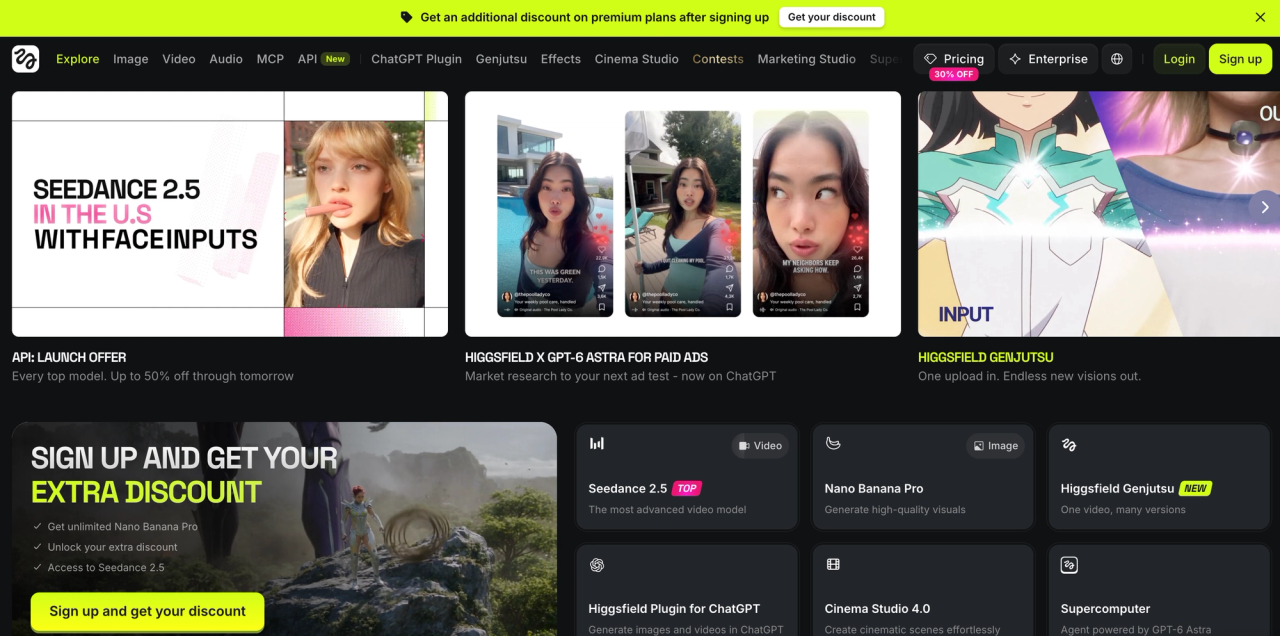
4. Higgsfield: best for Kling alongside camera presets
- Pricing: $3 one-time access pass (40 credits) · Starter $19/mo (270 credits, Fast and Mini variants only) · Plus $59/mo or $47 annually (1,200 credits, full line-up) · Ultra $129/mo or $99 annually (3,000 credits)
- Kling access: Kling 3.0; Plus and above for the full model line-up
Compared with Kling AI: Higgsfield offers Kling 3.0 inside a much larger toolkit, including Cinema Studio for camera direction and Soul ID for consistent characters. Higgsfield says Cinema Studio supports "multiple video model families" and that Soul characters can be carried into "some other models" as Elements — but it doesn't publish which, so check that the combination you want works with Kling before you buy.
Where it falls short: there's no permanent free tier, plan credits reset each cycle, and Starter is limited to Fast and Mini model variants.
5. Pexo: best for hands-off short videos
- Pricing: Free watermarked tier · Pro $30/mo (4,800 credits) · $60 (10,000) and $100 (18,000) tiers
- Kling access: routed automatically alongside Seedance and Veo
Compared with Kling AI: Pexo is a conversational agent. You describe the video, and it writes the script, generates shots, and adds voiceover, music and captions. It picks models for you, so Kling may render some shots, but you can't count on it for a given shot.
Where it falls short: videos top out around one minute, subscription credits don't roll over, and you give up direct control of which model renders what.
Path 2: Switch to a different model
How Kling 3.0 ranks right now
Artificial Analysis Video Arena, text-to-video, checked September 23, 2026. Rankings come from blind human votes; higher Elo means voters preferred the output more often.
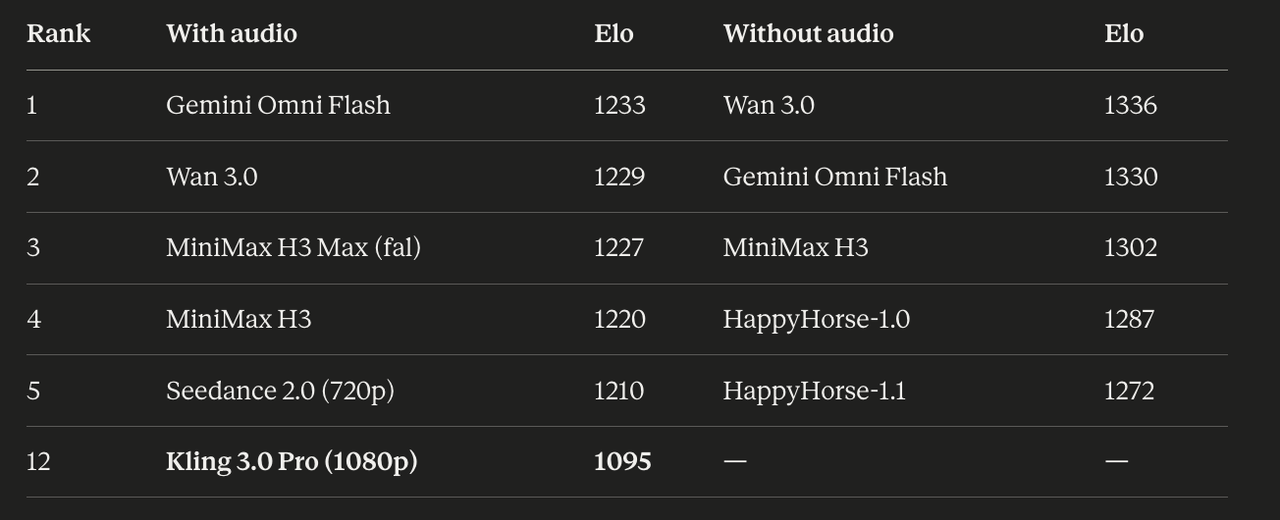
Arenas disagree: llm-stats ranked Kling v3 first in September 2026. And leaderboards measure general preference, not your use case — Kling's strength in human motion may matter more to you than an overall score. Use this as a shortlist, then test.
6. Hailuo (MiniMax H3): best for native 2K with sound
- App pricing: Standard $10.50/mo or $8.40 annually (1,000 credits) · Pro $38 · Master $89 · Max $216
- API pricing: about $0.13/s at 2K and $0.08/s at 768p
- Credit rules: membership credits expire after a month; failed or review-rejected generations are refunded automatically
Compared with Kling AI: MiniMax H3 ranked third without audio and fourth with audio in our September 23 snapshot, renders 2K natively, and generates stereo audio in the same pass. In the Hailuo app, H3 works out to about $0.074/s at 768p or $0.126/s at 2K on Standard, falling on higher tiers. Kling's app charges about 6 credits a second for 720p Kling 3.0 without audio — roughly $0.08/s at Standard's renewal price. Resolution and audio differ, so run your own brief before assuming either is cheaper for you. The automatic refund on failed generations is a genuine difference.
Where it falls short: clips run 5–15 seconds, and there's no Kling-style Motion Control documented.
7. Google Flow: best for the top-ranked model with audio
- Pricing: 50 free credits a day · Google AI Plus $4.99/mo (about 200 credits) · AI Pro $19.99/mo (about 1,000) · Ultra tiers above
- Models: Gemini Omni Flash 1.1 (4–10 seconds, 720p or 360p draft) and Veo 3.1 Lite, Fast and Quality (4–8 seconds)
Compared with Kling AI: Flow is the easiest way to try Gemini Omni Flash, which ranked first with audio on September 23, alongside Veo 3.1. Its free tier refreshes 50 credits every day, where Kling's non-subscribers get a small monthly allowance — though since credits aren't comparable, judge the free tiers by how many usable clips you get, not the numbers.
Where it falls short: Veo 3.1 clips top out at 8 seconds, and only Veo 3.1 Lite can extend an 8-second clip. Gemini Omni Flash maxes out at 10 seconds and 720p in Flow. Google models only.
8. Seedance 2.0 (Dreamina): best for holding a product or character steady
- Pricing: daily free tokens on Dreamina · paid plans vary by region · API via BytePlus
- Models: Seedance 2.0
Compared with Kling AI: Seedance 2.0 ranked fifth with audio in our September 23 snapshot, and accepts up to 12 reference inputs to keep a product or character consistent across generations — more than Kling 3.0 Omni's seven images.
Where it falls short: it's a single model with clips up to 15 seconds, and pricing varies by region.
9. Pika: best for several top models on one cheap plan
- Pricing: Free (no monthly credits; credit packs only, no watermark, no commercial license) · Starter $10/mo or $8 annually (900 credits, no commercial license) · Creator $35/mo or $28 annually (3,150 credits, commercial license) · Fancy from $95/mo
- Models: Pika 2.5 plus partner models including Seedance 2.5, MiniMax H3, Wan 3.0, Gemini Omni Flash and Grok Imagine, on every paid plan
Compared with Kling AI: Pika has changed a lot. Beyond its own effects-focused models, every paid plan now includes several models that currently rank above Kling 3.0, including Wan 3.0 and Gemini Omni Flash. That makes it a low-cost way to test the leaderboard's top models side by side.
Where it falls short: commercial use starts at the $35 Creator plan — Starter is personal only. There's no Kling 3.0, and the free plan includes no monthly credits.
10. Luma: best for HDR delivery and editing existing footage
- Pricing: limited free tier (watermarked, personal use) · Plus $30/mo or $300/year (10,000 credits) · Pro $90/mo · Ultra $300/mo
- Models: Ray3.2 plus partner models
Compared with Kling AI: Luma (formerly Dream Machine) does what Kling doesn't. Ray3.2 outputs native 16-bit HDR with EXR export for color grading, and edits existing footage up to 20 seconds while keeping its motion and timing.
Where it falls short: Ray3.2 doesn't generate audio natively — sound comes from separate integrated models — and the $30 entry price is more than three times Kling's Standard renewal.
How we're testing these Kling AI alternatives
Rankings and price tables only go so far. We're running three briefs through every tool, chosen to test what Kling is known for and where alternatives might beat it:
- Athletic movement — a sprinter's start and first ten strides, tracking shot. Tests motion realism and physics.
- Product shot — a matte-black water bottle rotating on stone, with condensation. Tests product fidelity and prompt adherence.
- Short multi-scene ad — three connected scenes with the same person and product. Tests character and product consistency across shots.
For each tool we record the plan and settings used, the number of attempts, how many outputs were usable, and the total credit cost converted to dollars — including failed attempts.
Kling AI pricing in 2026
Kling has a free Basic tier and four paid consumer plans. These figures come from a September 13, 2026 check; offers vary by account and region, so confirm at checkout.
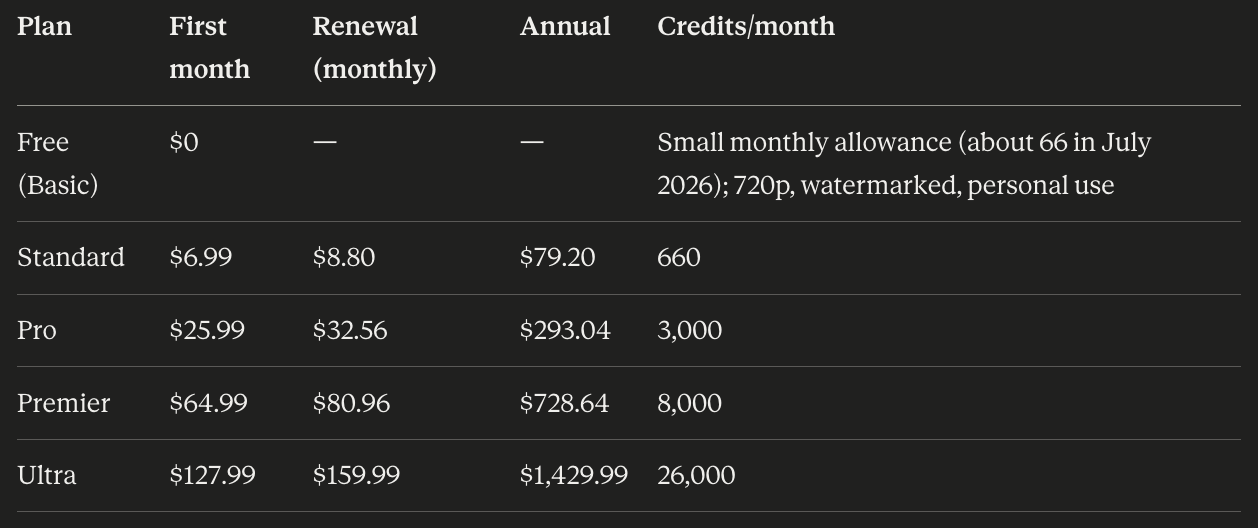
Credits expire on different clocks: subscription credits 31 days after issue, purchased credits after two years, trial credits after seven days, and subscribers' daily bonus credits at local midnight.
The developer API is billed separately, per second: Kling 3.0 lists $0.084/s at 720p and $0.112/s at 1080p without audio, and $0.126/s and $0.168/s with native audio. API packages start at $700 for 5,000 units and expire after 180 days.
Before you cancel Kling AI
- List the Kling features you actually use — Motion Control, Multi-Shot, voice-bound elements — and test each one on your replacement first.
- Check the renewal price, not the introductory price, when comparing costs.
- Spend or note purchased credits; they last up to two years, far longer than plan credits.
- Remember that annual memberships still release credits monthly, and unused ones expire 31 days after issue.
- Cancel before your renewal date, and keep the confirmation.
- Save your best prompts, reference images and voice samples.
Kling AI alternatives: frequently asked questions
Can I use Kling 3.0 without the Kling app?
Yes. Runway includes Kling 3.0 Pro on every paid plan from $15/month, LTX Studio includes it from its $35 Standard plan, Higgsfield includes it with the full line-up on Plus, and DreamBench runs it inside multi-scene videos. None of them document every Kling-app feature, such as Motion Control, so test the features you rely on.
What is the best alternative to Kling AI?
It depends on your path. To keep Kling 3.0, Runway is the cheapest option with a full editor. To switch models, Google Flow gives access to Gemini Omni Flash, ranked first with audio on the Artificial Analysis leaderboard on September 23, 2026, and Hailuo offers MiniMax H3 at native 2K.
Does Kling AI have a free plan?
Yes, but it's smaller than many guides claim. Non-subscribers get a small monthly allowance — about 66 credits a month in a July 2026 check — capped at 720p, watermarked and for personal use only. The often-quoted "66 credits a day" is out of date.
How much does Kling AI cost in 2026?
A September 13, 2026 check found Standard at $6.99 for the first month then $8.80 (660 credits), Pro at $25.99 then $32.56 (3,000), Premier at $64.99 then $80.96 (8,000), and Ultra at $127.99 then $159.99 (26,000).
Do Kling AI credits roll over?
No. Subscription credits expire 31 days after they're issued. Purchased credits last up to two years, and trial credits expire after seven days.
Which AI video models rank above Kling 3.0?
On the Artificial Analysis text-to-video leaderboard with audio, checked September 23, 2026, Gemini Omni Flash ranked first and Kling 3.0 Pro (1080p) ranked 12th. The llm-stats arena ranked Kling v3 first in September, so rankings depend on the arena and the prompt.
Geschrieben von
Vance Lim · Technical Writer
Vance is a technical writer who is well versed in the areas of AI, Tech and Business. He has over 4 years of technical writing experience and have wrote articles that ranked well on SEO in major companies like Bytedance, Trendsi, Shopee and more.