AI video editing
What is motion transfer?
Motion transfer is AI video editing that takes the movement from one video and applies it to a different character. The model reads the performer’s pose and timing frame by frame, then generates a new character, from a picture or a description, making the same moves with the same timing, from a dance to a shrug.
By the DreamBench team. Updated .
Motion transfer at a glance
At a glance
- Also called
- Motion control, pose transfer or dance transfer, depending on the product.
- Input
- A driving video (the performance) and a target: a picture or a description of the new character.
- Output
- The new character performing the same movement, with the same timing.
- Keeps
- Pose, timing, often the camera. Not the performer’s face, body or clothes.
- Good for
- Dances and trends, character animation, ads with a mascot, pre-visualization.
- Struggles with
- Hands, crossed limbs, very fast moves, bodies far from human shape.
Motion transfer, before and after
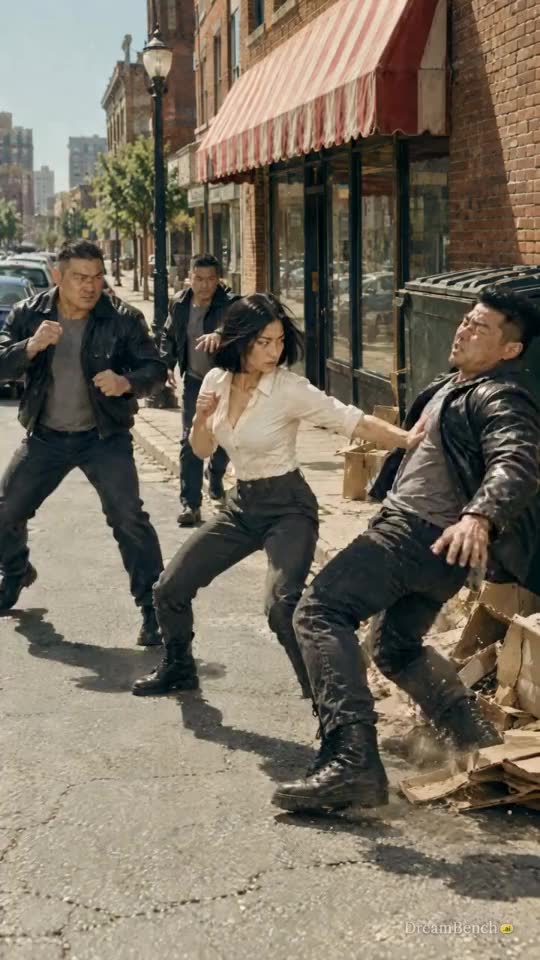 Original
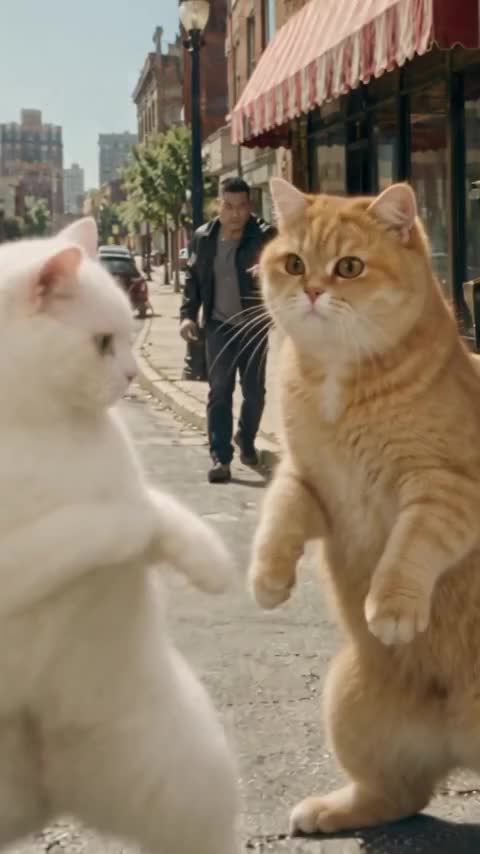 With Morph
Look closely and the two aren’t identical frame for frame. Morph set the camera lower and closer and staged the opening throw as a close-up. That is typical of generative motion transfer: it carries the beats of a performance, its timing and poses, while the camera and the details are generated again.
How motion transfer works
The performance
A clip of someone moving: the source of the motion.
The motion
Their pose, read frame by frame: joints and timing, no appearance.
The new character
A different character generated in the same pose at the same moment.
Motion transfer works in two steps. First, a pose model reads the performer in every frame: where the head, shoulders, elbows, hands, hips, knees and feet are. The result is a moving skeleton with none of their appearance.
Then a video model generates the new character with that skeleton as a guide, frame by frame, while a picture or description fixes what the character looks like. Research systems such as Everybody Dance Now (2018) and Animate Anyone (2023) established the approach; today’s video models fold it into one pass, sometimes reading depth and the face as well as the skeleton.
The guiding step is often built like ControlNet, a 2023 method that adds spatial controls, such as edges, depth and human pose, to an image model that has already been trained. The pose steers where the body goes; the model still draws everything else.
Types of motion transfer
| Reads | Carries over | |
|---|---|---|
| Full-body pose transfer | The skeleton: head, shoulders, elbows, hands, hips, knees, feet | Dances, walks, gestures and fights, with their timing |
| Face and expression transfer | Points on the face: eyes, brows, mouth, the turn of the head | Expressions, blinks, head movement and mouth shapes |
| Camera motion transfer | How the camera moved through the scene | A push-in, an orbit or a handheld shake, not any body |
Motion transfer, motion capture and rotoscoping
| Output | Used for | |
|---|---|---|
| Motion transfer | A finished video of a new character | Social video, ads, quick animation |
| Motion capture | Animation data for a 3D rig | Games, films, 3D characters |
| Rotoscoping | Outlines or drawings traced over footage | Visual effects, hand-drawn animation |
What people use motion transfer for
- Trends: a dance performed by a pet, a cartoon character or a historical figure.
- Mascots and brand characters that move like a real presenter.
- Animation without keyframing: act the movement out on a phone, give it to a character.
- Pre-visualization: block a scene with a stand-in, then see it with the final character.
Where motion transfer breaks
- Hands and fingers: small and fast, they are often read wrong and come out blurred or extra.
- Overlap: arms crossing the body or two people touching confuse the pose.
- Very different bodies: a human dance given to a snake or a car has no joints to map onto.
- Speed: very fast moves and motion blur lose frames of the skeleton.
- Consistency: the new character’s face and clothes can drift as it moves; see temporal consistency.
Why did Morph edit my clip instead of copying its moves? Morph reads the task from your words: a sentence that asks for someone to do, copy or follow the moves, or to dance like the clip, makes a new video on its moves, and so does a sentence that only describes someone somewhere, such as ‘a cartoon fox in a forest clearing’. A sentence that opens on a verb of change, such as ‘replace’, ‘remove’ or ‘turn’, edits the clip in place, unless it makes someone do the moves. If it read you wrong, switch to Copy the moves before you run it; the composer says under your words which of the two it will make.
Use performances you filmed or have the rights to, and don’t make a real person appear to do something they didn’t without their consent.
Motion transfer on DreamBench
In Morph, choose Transfer a motion, upload a clip of 4 to 30 seconds or pick a template, and tag the character who should perform it with a picture. Morph keeps the timing of the original. It is one of the five edits Morph makes; see AI video editing for the others.
| Limit | What it means | |
|---|---|---|
| The driving clip | An MP4, MOV or WebM upload, or a template; a window of 4 to 30 seconds | Pick the part with the moves: the price is a fixed base plus a rate for each second of the window, shown before you run it. |
| The character | Up to 4 pictures, PNG, JPEG or WebP, 10 MB each, named @Image1 to @Image4 in your words | A clear picture of the character fixes the face, body and clothes; the clip fixes only the movement. |
| Real people | Exactly one photo, the person who does the moves, with the box checked that it is you or someone who agreed | The photo, its own background included, is driven by the clip on a lane that accepts faces. |
| The words | Up to 2000 characters; ‘do the same moves’ or ‘dances like this’ switch Morph to Copy the moves on their own | A sentence that only describes the new character, with no verb of change, is read as the moves too; switch it yourself if Morph guessed wrong. |
| Output | A Preview at 480p, then Make it HD at 1080p or 720p; the original’s sound kept | A dance stays on its music; the 1080p render completes the preview’s take, 720p renders afresh. |
Questions
Is motion transfer a deepfake or a face swap?
It can be a deepfake: moving a cartoon or your own character isn’t, but making a real person appear to perform something they didn’t, without their consent, is, and may be illegal where you live. It is not a face swap: a face swap keeps the video and changes who the face belongs to, while motion transfer keeps only the movement and generates a new character, face and body included.
How do I make a character perform a dance from a video?
To make a character perform a dance from a video, use a clip of one person fully in frame, 4 to 30 seconds, with a steady camera. In Morph choose Transfer a motion, upload the clip, and tag the character with a picture. Morph keeps the original’s timing and generates the character performing it.
Do I need a 3D model for motion transfer?
No. AI motion transfer works from a video and a picture or description. Motion capture for 3D animation is the method that needs a rig.
What kinds of movement transfer most reliably?
One person, fully in frame, moving at a moderate speed with the camera mostly still: dances, walks and gestures. Fast spins, crossed limbs, hands and two people touching are the least reliable: hands are small and fast, so the pose model often reads them wrong and the video model blurs or adds fingers, and two performers who cross or touch confuse the pose reading, so transfer them one at a time.
Can I use any video as a motion reference?
Technically, most clips work, but only use performances you filmed or have the rights to. Morph takes a clip of 4 to 30 seconds.
How does motion transfer relate to character consistency?
Motion transfer sets how a character moves; character consistency keeps how it looks. A good result needs both: the right moves, and the same face and clothes from the first frame to the last.
What makes a good driving video?
One person, fully in frame, against a plain background, in steady light, with a camera that doesn’t move much. Clear, not-too-fast movement transfers best.
Does motion transfer keep the camera movement?
Usually, but not always. The beats and poses carry over; a generative tool may reframe, as the fight edit above does by setting the camera lower and closer. Ask for the camera to stay as filmed if it matters.
Can I transfer a human’s movement to an animal or a cartoon?
Yes, when the body has limbs the skeleton can map onto: the fight above is performed by three cats. A snake or a car has no joints to receive the pose, so the result drifts.
Does motion transfer cost anything?
Several tools offer a trial. On DreamBench you create a free account and choose a plan, and each Morph edit uses credits from it.
Can I make myself do the dance from a video?
Yes. To make yourself do the dance from a video on DreamBench, turn on Real people in Morph, add exactly one photo, the person who does the moves, and check the box that it is you or someone who gave permission. The photo, its own background included, is driven by the clip on a lane that accepts faces; by default Morph refuses a real face. Use only your own face, or one you have permission for.
Does motion transfer keep the sound of the original video?
Motion transfer on DreamBench keeps the sound of the original video: the clip’s own sound is laid back under the new video at the end, the step shown as Adding the sound, so a dance stays on its music and a line is still heard where it was spoken. The switch Keep the clip’s sound is on by default; turn it off to add your own track in an editor. Only use music you have the rights to post.
Why does my character’s face change during the dance?
Your character’s face changes during the dance because every frame of the new character is generated, with the skeleton fixing only where the body goes; the face is redrawn each frame from your picture and the model’s memory, and fast turns, hands crossing the face and long clips give it more chances to drift. Use one clear, well-lit picture of the character, pick a part of the clip with slower moves, keep the window short, and render the keeper at HD.
Related
Terms
Sources
- Everybody Dance NowarXiv, read on
- Animate Anyone: Consistent and Controllable Image-to-Video Synthesis for Character AnimationarXiv, read on
- Adding Conditional Control to Text-to-Image Diffusion ModelsarXiv, read on
DreamBench is an independent platform and isn’t affiliated with or endorsed by the companies named on this page.