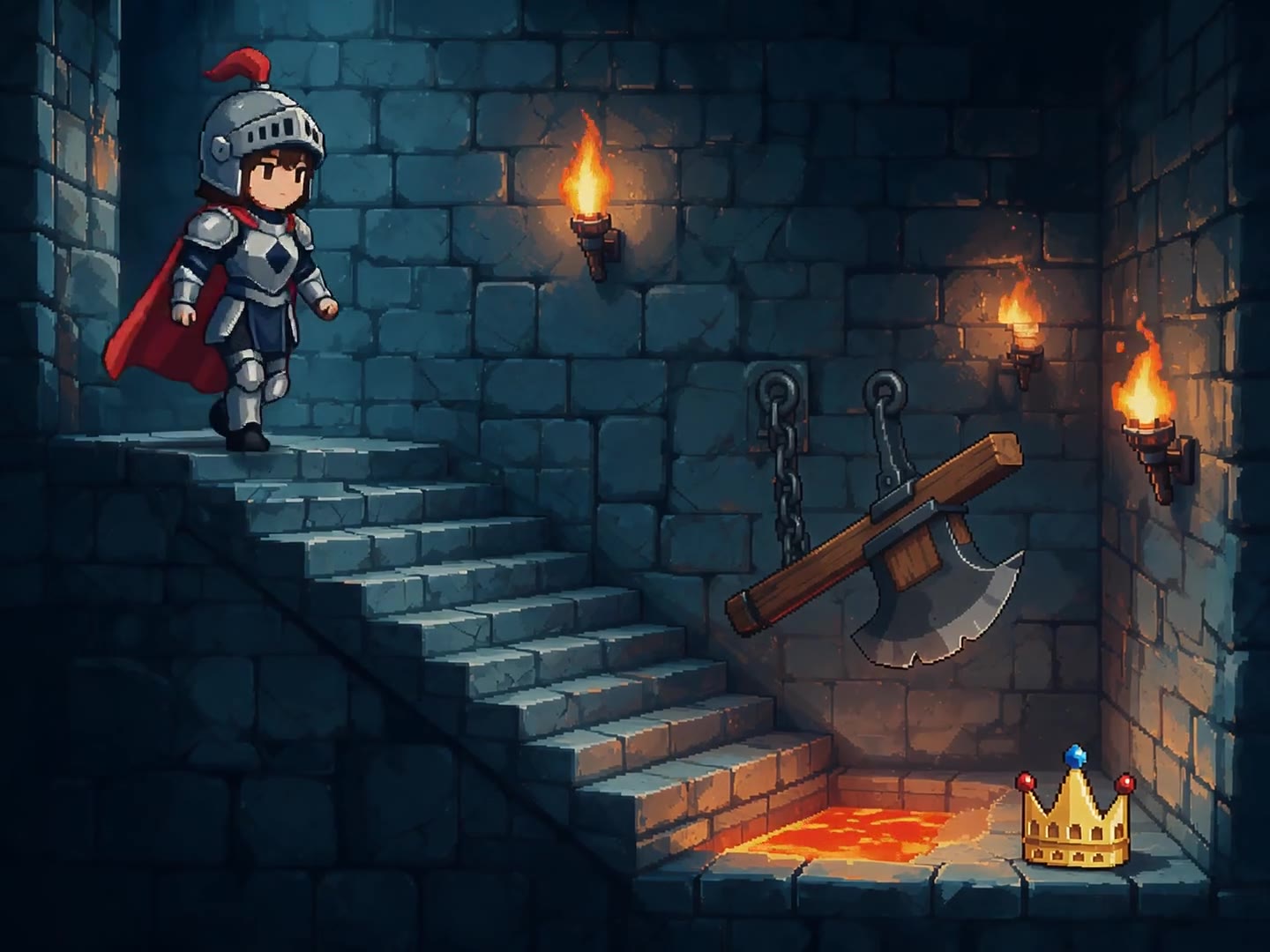
Wan 2.7 makes clips of up to 15 seconds, and Alibaba says it can draw on thousands of style combinations. On DreamBench it can bring every scene of your video to life in the look you describe, and you can redo any scene on its own.
A video made with Wan 2.7 on DreamBench, and the exact prompt that made it.
1080P · 4:3 · 10S · Sound
Pixel-art animation, 16-bit style. A tiny knight sprite descends a torch-lit dungeon staircase, pixels flickering with the flames. She dodges a swinging pixel axe, hops a gap over pixel lava, and lifts the lost crown as it sparkles in a four-frame twinkle. Chiptune-adjacent bleeps as SFX only.
The length is the whole video’s: DreamBench plans the scenes, makes each one with Wan 2.7 and joins them. Create with Wan 2.7 opens Film Studio with your prompt and every setting in place.
Examples
Made with Wan 2.7 on DreamBench
Published templates, each with the prompt that made it. Use one as it is or make it your own.
1080P · 4:3 · 10S · Sound
Pixel-art animation, 16-bit style. A tiny knight sprite descends a torch-lit dungeon staircase, pixels flickering with the flames. She dodges a swinging pixel axe, hops a gap over pixel lava, and lifts the lost crown as it sparkles in a four-frame twinkle. Chiptune-adjacent bleeps as SFX only.
Strengths
What Wan 2.7 is good at
01
Thousands of styles
Alibaba says Wan 2.7 offers thousands of style combinations, so a scene can be manga ink, 16-bit pixel art or 3D animation rather than live action.
02
Faces that show feeling
With more than 50 finely tuned emotional expressions to draw on, Wan 2.7’s characters can react with a wince, a smirk or a burst of laughter.
03
Music and effects built in
Wan 2.7 adds background music or sound effects that suit the scene, and on DreamBench you decide whether to keep them.
At a glance
Wan 2.7 on DreamBench
15s
longest clip per generation
S1S2S3S4S5
5 min
longest video on DreamBench
depending on your plan
720p1080p4K
1080p
top resolution
720p and 1080p
4
aspect ratios
1:1, 16:9, 9:16 and 4:3
On / off
sound
Your choice, per video
The model
What is Wan 2.7?
Made by Alibaba Cloud
Released April 2026
Video model
Clips up to 15 seconds
Wan 2.7 is a video model from Alibaba Cloud’s Wan family, launched in April 2026 as a set of 4 models: text-to-video, image-to-video, reference-to-video and video editing. It makes clips of 2 to 15 seconds at 720p or 1080p.
Alibaba built it for style and performance: it offers thousands of style combinations and more than 50 finely tuned emotional expressions. When its image-to-video model has no soundtrack to follow, it adds background music or sound effects to suit the picture.
In August 2026 Alibaba followed it with Wan 3.0, which doubles the length of a single generation to 30 seconds.
What you get when you make videos with it on DreamBench, where one model makes every scene of a video.
Made by
Alibaba Cloud
Longest clip
15 seconds per generation
Video length on DreamBench
Up to 30 seconds on Starter, 2 minutes on Plus and 5 minutes on Ultra and Studio
Resolution
720p and 1080p
Aspect ratios
1:1, 16:9, 9:16 and 4:3
Sound
On or off, your choice
Reference images
Up to 8 per video; the first 4 are included, then 43 credits each
Plans
Every plan
Credits
32 per second at 720p and 42 per second at 1080p, plus 183 per video
A 15-second 720p video with sound uses 663 credits. You always see the exact cost before you generate.
Good to know
On DreamBench, Wan 2.7 animates an opening frame for each clip. DreamBench draws that frame in the style you asked for, from your reference images or the characters, props and places it designs for you.
Wan 2.7 adds music or sound effects to fit the picture, not lip-synced speech, because DreamBench doesn’t give it a voice track to follow. The sound switch in the composer keeps that sound or removes it, and the price is the same either way.
On DreamBench, a Wan 2.7 clip doesn’t cut to a new setting partway through. When your story moves somewhere new, the change comes at the start of the next clip, or the camera travels there on screen.
Through Alibaba’s own tools, Wan 2.7 can also lip-sync to a voice track you supply, continue an existing clip and edit video from plain-language instructions. On DreamBench, you guide each scene with your prompt and reference images, and you change it by giving it new direction.
Estimate your credits
A Wan 2.7 video, as the composer prices it.
663credits
Available from Starter. Starter’s 1,100 monthly credits make one video like this. You always see the exact cost before you generate.
Side by side
Wan 2.7 compared
Wan 2.7 beside the models people weigh it against, as each runs on DreamBench. Every cell comes from the same tables as the spec sheet above.
Pick Wan 2.7 in the composer, or press Create with Wan 2.7 on this page.
16-bit pixel-art animation in 4:3.
Generate
Step 2
Describe your video
Write what should happen, or start from a template. Add reference images for the characters, products or places you want to see.
S1S2S3
Scene 1 keptScene 2 againScene 3 kept
Step 3
Generate, then refine
DreamBench plans the scenes, designs the characters and places, generates each scene with Wan 2.7 and joins them. Then change any scene you want to improve and keep the rest.
Prompt ideas
Prompt ideas for Wan 2.7
Start from one of these and change it however you like.
01
Wok fire at the night market
Black-and-white manga animation, widescreen 16:9. At a crowded night-market stall, a young cook tosses noodles high out of a blazing wok while steam curls into inked swirls and speed lines burst behind her. She catches them without looking and slams the bowl down with a grin. Screentone shading throughout, with one splash of color: the red chilli oil. Sizzling oil, clattering pans, a roaring flame.
02
The pixel garden
16-bit pixel-art animation in 4:3. A tiny wizard sprite waters a garden on a floating island at sunset. Each seed pops up in a few frames: a turnip, a sunflower, then a mushroom that sneezes a cloud of spores and sends the wizard tumbling. Chunky pixel clouds drift past. Retro game blips, a springy boing and a sparkle chime as sound effects.
03
The robot baker
Stylized 3D animation, vertical 9:16. In a cozy kitchen, a round copper robot bakes a birthday cake: it cracks eggs with a pincer, spins the whisk far too fast and splatters cream across its face, then proudly lights a single candle and blinks its round screen eyes at the camera. Clattering pans, a whirring motor, a tiny ding.
04
Paper plane at dusk
Anime, widescreen 16:9. A schoolgirl sits on a rooftop at dusk and folds a paper plane from a page of her notebook. She lets it go, and the wind carries it out over the city as the streetlights flicker on below. Soft cel shading, a pink and orange sky, her hair lifting in the breeze. Wind, distant traffic, a gentle piano melody.
Still have questions?
Wan 2.7 FAQ
What is Wan 2.7?
Wan 2.7 is a video model from Alibaba Cloud’s Wan family, launched in April 2026. It makes clips of 2 to 15 seconds at 720p or 1080p, and Alibaba says it offers thousands of style combinations. Wan 3.0 followed in August 2026.
How long can a Wan 2.7 video be on DreamBench?
Each clip Wan 2.7 generates runs up to 15 seconds. A whole DreamBench video can be longer, up to 5 minutes depending on your plan, because DreamBench plans the scenes and joins the clips into one video.
What resolution does Wan 2.7 use on DreamBench?
Wan 2.7 renders at 720p or 1080p on DreamBench, your choice. You can make it square (1:1), widescreen (16:9), portrait (9:16) or 4:3.
Can Wan 2.7 make anime, manga, pixel-art or 3D animated videos?
Yes. Wan 2.7 can make anime, manga, pixel-art and 3D animated video. Describe the look you want and DreamBench draws each clip’s opening frame in that style; Wan 2.7 then animates it, adding music or sound effects to suit. Alibaba says the model offers thousands of style combinations.
Can Wan 2.7 use a first and last frame?
Wan 2.7 itself takes a first and last frame and fills in the motion between them. On DreamBench, each clip starts from an opening frame that DreamBench draws in your style, and the prompt directs where the shot goes. Continuing an existing clip is a feature of Alibaba’s own tools, not of DreamBench.
Does Wan 2.7 make sound, and can its characters talk?
Yes. Wan 2.7 adds background music or sound effects that fit the picture. On DreamBench you can keep that sound or switch it off in the composer, and the price is the same either way. In Alibaba’s own tools, Wan 2.7 can also lip-sync to a voice track you supply; on DreamBench it adds music or effects rather than speech, so for dialogue choose Wan 3.0, Kling 3.0 or Seedance.
How much does Wan 2.7 cost on DreamBench?
Wan 2.7 uses credits for each second of video, plus a base amount per video, at a rate set by the resolution. The table on this page shows the current rates, and you always see the exact cost before you generate.
Does Wan 2.7 cost anything to use?
Yes. On DreamBench, each Wan 2.7 video uses credits, which come with a paid plan, and Wan 2.7 is on every plan. A second costs the same with sound on or off, and the composer shows the exact cost before you generate. You need no Alibaba Cloud account or API key: DreamBench runs Wan 2.7 for you, in the browser on a phone, tablet or computer (Android, iPhone, Mac, Windows). Alibaba Cloud also sells Wan 2.7 by the second at its own rates.
Is Wan 2.7 open source?
No. Alibaba offers Wan 2.7 through its API and partner tools and has not published its weights; the newest Wan video models with published weights are the Wan 2.2 family on Hugging Face. On DreamBench, Wan 2.7 runs on every plan with no GPU or setup.
What is the difference between Wan 2.7 and Wan 3.0?
Wan 3.0 runs to 30 seconds a clip with dialogue, music and effects in every clip; Wan 2.7 runs to 15 seconds with music or effects you can keep or remove, and is the one to pick for anime, manga, pixel-art or 3D looks. Both render 720p or 1080p on DreamBench, and the compared table on this page lists the credits.
Can Wan 2.7 make a video from a photo on DreamBench?
Yes. Upload reference images, up to 8 per video, and DreamBench draws each clip’s opening frame from them in the style you ask for; Wan 2.7 animates that frame and adds music or effects to suit.
What makes a good Wan 2.7 prompt?
Name the style first (anime, manga, pixel art, 3D animation or live action), then the shot, the subject and one or two actions, the setting and the light, and the music or effects you want. DreamBench draws the opening frame in that style and Wan 2.7 animates it, so describe the motion, not just the picture.
What are Wan 2.7’s limits?
Each clip runs from 2 to 15 seconds at 720p or 1080p. On DreamBench, Wan 2.7 adds music or effects rather than lip-synced speech and doesn’t cut to a new setting mid-clip. Alibaba’s API takes prompts in Chinese and English.
Are Wan 2.7 videos watermarked?
On DreamBench, Starter videos carry a small DreamBench watermark, which Plus, Ultra and Studio remove. Alibaba’s own API can add an “AI Generated” mark in a corner of a Wan 2.7 video, and leaves it off unless asked.
Can I use Wan 2.7 videos commercially?
Yes. DreamBench’s Terms of Use allow personal and commercial use, including ads and client work. You need the rights to anything you upload.
Which DreamBench plans include Wan 2.7?
Available on every plan. Video length depends on the plan: up to 30 seconds on Starter, 2 minutes on Plus and 5 minutes on Ultra and Studio.
What aspect ratios does Wan 2.7 support on DreamBench?
4: 1:1, 16:9, 9:16 and 4:3. Pick the ratio in the composer, or name it in the prompt and DreamBench sets it for you.
How do I make a video with Wan 2.7 on DreamBench?
Press Create with Wan 2.7, or pick it in the composer, and describe the video you have in mind. DreamBench writes the scene plan, generates every scene with Wan 2.7 and joins them into one video. Then give any scene new direction and keep the rest.
Were the example videos on this page made with Wan 2.7?
Yes. Every film on this page is a published DreamBench template made with Wan 2.7, shown with the prompt that made it. No film or still from another model appears on this page.
Wan 2.7 is developed by Alibaba Cloud. DreamBench is an independent platform that offers Wan 2.7 alongside other models, and isn’t affiliated with or endorsed by Alibaba Cloud. The facts on this page were last checked on . Wan 2.7 and Alibaba Cloud are trademarks of their owners, used here only to name the model and its developer.
Make your video
Create withWan 2.7
Describe the video you have in mind. DreamBench plans the scenes, and you change the ones you want to improve.