AI video generation
What is character consistency in AI video?
Character consistency is how well an AI video keeps the same character looking like the same person, creature or mascot from one shot to the next: the same face, hair, build, clothes and voice. Each shot is a separate generation, so without references or a character sheet the model reinvents the character every time.
By the DreamBench team. Updated .
Character consistency at a glance
At a glance
- Means
- The same character is recognizably the same in shot 1 and shot 30, whatever the place, light or camera.
- Covers
- Face, hair, body, clothes and props they carry, and on models with sound, the voice.
- Why it’s hard
- A video model makes one shot at a time and remembers nothing from the last one.
- What carries it
- The same reference pictures, ideally a character sheet, and the same words in every shot.
- Not the same as
- Temporal consistency, which is about frames agreeing inside one clip.
- Breaks first on
- Side and back views, small faces in wide shots, hands, and clothes that change.
Character sheet
Front
Side
Back
Drawn once: the same face, hair, coat and scarf in every view, on a plain ground with no shadow and nobody else.
Every shot
Shot 1: wide, a street at night
Shot 2: medium, a forest
Shot 3: close-up, indoors
Shot 4: wide, a beach by day
What goes with every shot
- The sheet, as a reference picture or an opening still
- The same identifiers, word for word, in every prompt
- The same voice, on models that make sound
New place, new light, new framing: the character stays the same person because every shot is given the same sheet and the same words, not because the model remembers the last shot.
How AI keeps a character the same across shots
A video model makes a film one shot at a time, and nothing passes from shot 4 to shot 5 unless you pass it: the model starts again from noise and invents whatever the prompt leaves open. Write “a woman with short blond hair” twice and you get two different women.
So consistency comes from what every shot is given. The same words help. A picture helps more, because a face is easier to show than to describe: models that take one, the mode called reference to video, keep the face, hair and colors they can see. A character sheet, the character from the front, side and back, helps most, because it also shows them turned round.
Starting a shot from a picture of the character, as image to video does, works too: the first frame is fixed, and the further the shot moves from it, the more is invented again.
Under the hood: references, identity embeddings and seeds
A reference picture reaches the model through attention, the same mechanism the text uses. IP-Adapter adds an image as a prompt through cross-attention layers of its own, kept separate from the text’s, in an adapter of about 22 million parameters, with the model itself unchanged.
Identity methods go further and encode the face itself. InstantID works from a single photo of a face: a separate network steers generation with that face’s features and landmarks, so the person stays recognizable while style and pose change. That encoded face is an identity embedding.
The oldest route is to teach the model the character. DreamBooth fine-tunes a model on a few pictures of a subject until it binds a unique word to it, then generates that subject in new scenes, poses, views and light. LoRA, first published for language models, makes such a fine-tune light: the model’s own weights stay frozen and only small added matrices are trained. Both need a model whose weights you can train.
Another idea is to generate the pictures together. StoryDiffusion shares attention across a batch of images, with no training, so a subject agrees across a series; multi-shot video models hold a cast across their own cuts in a similar way, but only within one generation.
Why doesn’t the seed carry the character? A seed fixes the starting noise, so the same seed with the same prompt, length, frame and model repeats the same clip. A new shot changes at least one of them, the same noise is read in a new way, and the last face is stored nowhere.
Reference image, character sheet, seed or LoRA: what each keeps
| What it keeps | What it loses | |
|---|---|---|
| The same description in every prompt | The broad strokes: hair color, age, the outfit | The face. Words can’t pin one, and new wording is read as a new person. |
| The same seed | The same clip again, from the same prompt and settings | Everything, as soon as the prompt, the length, the frame or the model changes. |
| One reference picture | The face and colors the picture shows | Angles it doesn’t show, and sometimes its light and background come along. |
| A character sheet | Face, hair, build and outfit from several angles | Anything not on the sheet: a new outfit, a later age, a face too small to read in a wide shot. |
| A first frame | The picture exactly, at second zero | What the frame doesn’t show; drift grows further into the shot. |
| An identity adapter | A face from one photo, across styles and poses | Clothes and body; it needs a model built to take one. |
| A fine-tune (DreamBooth, LoRA) | A subject learned from several pictures, in new poses, views and light | Time: training for each character, on a model whose weights you can train. |
Character consistency vs temporal consistency
Both end in a face that changes, so they are easy to mix up. Temporal consistency is inside one clip: does frame 90 agree with frame 1? Character consistency is across clips: is the woman in the kitchen in shot 2 the woman on the train in shot 9? A steady clip can still show the wrong person.
Consistent
The same figure, color and size, frame after frame; only the motion changes.
Drifting
Marked frames: a flash of the wrong color (flicker), then a figure that slowly becomes someone else (identity drift).
| What stays the same | Over what | |
|---|---|---|
| Character consistency | Who someone is: face, hair, build, clothes, voice | Every shot and scene of a film |
| Temporal consistency | Everything in the frame | One frame to the next, inside one clip |
| Reference to video | A subject from the pictures you give | One shot; repeated in every shot, it is how most films get character consistency |
| First and last frame | The two ends of a shot | One shot: it pins a pose, not an identity across a film |
| Multi-shot video | The cast across the cuts the model makes itself | One generation; the next generation starts again |
| Style consistency | The look: medium, palette, grain | The whole film, whoever is in the shot |
First and last frame can carry one shot’s last frame into the next shot’s first: the join is smooth, but shot 12 still doesn’t know shot 3.
Character references on Veo, Kling and Seedance
Each model maker has its own way in. Google’s Vertex AI guide takes up to three images of a single person, character or product for Veo 3.1, and says Veo preserves the subject’s appearance in the video; on the standard model, a clip made with subject images is 8 seconds long.
Kling builds characters as elements. Its Element Library guide asks for two to four pictures an element, one main and up to three from other angles, recommends a front-facing main picture, and says Kling 3.0 binds up to three elements to a start frame.
Seedance takes many references at once, with one rule that matters here: BytePlus’s Seedance 2.0 series tutorial says those models don’t accept reference images or videos that directly contain real human faces, and offers its own digital characters and authorized real-person assets instead.
What makes a good character sheet
A model copies what a reference shows, wanted or not, so a good sheet is plain on purpose:
- The same face and hair in every view, front, side and back, the skin the same tone in each.
- One character to a sheet: a second face is a second identity to borrow from.
- A plain ground with no cast shadow or color cast, which would turn up in every shot.
- No text, labels or numbers, which a model may write into the shot.
- A clear front view as the main picture, as Kling recommends, with the whole outfit visible.
- Places on sheets of their own, empty of characters.
Why a character’s face changes between shots
| Why it happens | What to try | |
|---|---|---|
| Clothes change from scene to scene | The outfit was in the words of one shot and not the next, or not on the reference | Show the whole outfit on the sheet, and name it with the same words in every shot. |
| The face is wrong from the side or the back | The reference only showed the front | Use a sheet with side and back views, or keep the camera in front of the character. |
| The face is lost in wide shots | A face a few pixels high carries little of the reference | Hold the identity on things that read small: hair, colors, a scarf, a hat. |
| Hands, glasses or jewelry change | Small details are regenerated each shot, and left and right are easily mixed up | Name the detail and which side it is on, and keep fewer of them. |
| The character looks older or younger | Light, make-up and expression shift the apparent age | State the age in words in every shot, and keep the light close to the sheet’s. |
| Hair grows or shortens | The length wasn’t pinned, so it drifts with motion | Say the length exactly: “chin-length bob”, not “short hair”. |
| Two characters blend into one | Similar characters share features through the same attention | Make them different at a glance, and give each a sheet of their own. |
Why does my character change halfway through a shot? That is drift inside the clip, a temporal consistency failure: a shorter shot, less motion and a cut before a big turn help more than a new reference.
How to keep the same character in AI video: a checklist
- Make the character once, as a sheet, before any shot.
- Give that sheet to every shot that shows them, or start each shot from a picture made from it.
- Write their few defining details word for word in every prompt.
- Use one model for the whole film where you can: each reads a reference its own way.
- Compare stills from different shots side by side: a change you miss in motion is plain in stills.
Real people, likeness and consent
A reference picture of a real person is their likeness. Use your own, or one from someone who has given you permission, and say the video is AI-made when it could pass for real footage. Some models, Seedance 2.0 among them, refuse real faces outright.
On DreamBench, uploaded pictures are checked before any credit is used, and a picture that appears to show a real person under 18 is refused: the Terms don’t allow uploads or depictions of real people under 18. In Morph, a video with real people is made only after you check a box saying it is you, or people who gave their permission.
How DreamBench keeps a character the same in every shot
When you describe a film, DreamBench writes the script, then draws the cast before a single shot is rendered: every character, place and prop once, as a sheet, the same in every shot. Add a picture under “Who’s in it?”, tagged as a character, creature, location or prop, and that sheet is drawn from your picture, taking the subject alone and not its light or background; a sheet you made before is used as it is.
Before a sheet is drawn, each character and prop is given an identity lock: the face, the profile, the body and the size, written for the whole cast at once so that no two characters share a face. A short line of identifiers from it is written word for word into every shot that shows the character, with the character’s voice on models that make sound and the number of people on screen.
How a sheet reaches a shot depends on the model. On Seedance 2.5, Seedance 2.0, Veo 3.1 and Vidu Q2, the sheets go with each shot as reference pictures. On the other models, Veo 3.1 Fast and Lite and Kling 3.0 among them, DreamBench first draws an opening still from the shot’s sheets, and the shot starts from that still.
A change the story needs, such as a character soaked by rain, is drawn as a variant on their own sheet. If you choose to review, you meet the cast before anything is shot and can draw any sheet again, or from a picture of yours. A shot that still misses is redone with a note saying what to fix.
 Original
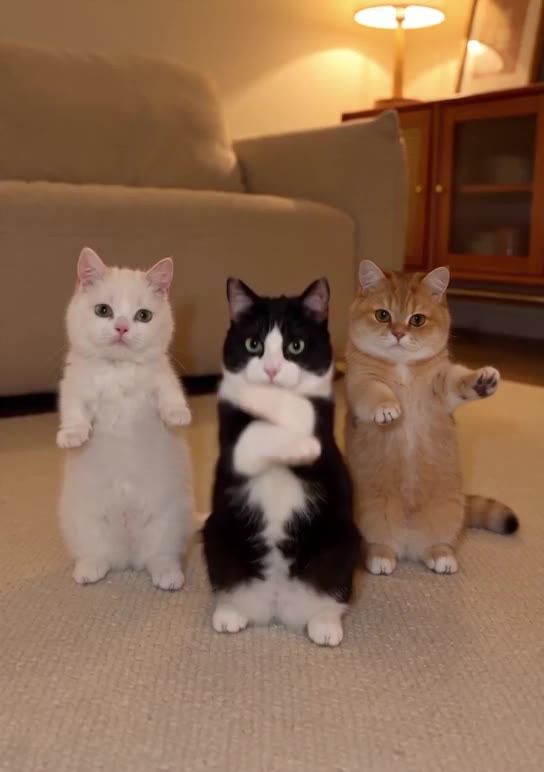 With Morph
Change the background to @livingroom, laid out as in @floorplan, but swap the 3 cats for @yickshuncat, @oreo and @mango.
Questions
How do you keep the same character in AI video?
You keep the same character in AI video by giving every shot the same reference, ideally a character sheet with front, side and back views, and the same few defining details written word for word in every prompt. Each shot is a separate generation, so anything you don’t repeat is reinvented.
Why does my character’s face change between shots?
A character’s face changes between shots because the video model generates each shot from scratch and remembers nothing from the last one. Without the same reference picture and description in every shot, it invents a new face that fits the words. Side views, back views and small faces in wide shots drift most.
How do I get a consistent character in Kling?
In Kling, a consistent character is made as an element: Kling’s Element Library guide asks for two to four pictures, one main and up to three from other angles, with a front-facing main picture for higher consistency. On DreamBench, Kling 3.0 shots start from an opening still drawn from the cast’s sheets.
What is a character sheet in AI video?
A character sheet is one picture of a character from several angles, usually front, side and back, with the same face, hair and outfit in every view on a plain ground. Each shot is given it as a reference, so the model knows how the character looks when they turn.
Does using the same seed keep a character consistent?
No. The same seed repeats a clip only with the same prompt, length, frame and model. A new shot changes at least one of them, so the face changes too. Reference pictures and repeated wording keep a character; a seed doesn’t.
What is the difference between character consistency and temporal consistency?
Temporal consistency is within one clip: whether each frame agrees with the one before. Character consistency is across clips: whether the person in shot 2 is the same person in shot 9. A clip can be steady and still show the wrong person.
How many reference images do I need for a consistent character?
One clear front-facing picture is the minimum, and a few views of the same character usually hold better, because the model then knows the profile and the back. Kling’s elements take two to four pictures, and Google’s Veo 3.1 takes up to three images of a single subject.
Can I use a photo of myself as an AI video character?
Yes, where the model accepts real faces: a photo of yourself is your own likeness, and a clear, front-facing, evenly lit picture works best. Some models refuse real faces, Seedance 2.0 among them. On DreamBench, pictures that appear to show a real person under 18 are refused.
Why does Seedance refuse my reference photo?
Seedance refuses a reference photo when it reads a real human face in it: BytePlus says Seedance 2.0 series models don’t accept reference images or videos that directly contain real human faces, and offers preset digital characters and authorized real-person assets instead.
Why do my character’s clothes change between scenes?
Clothes change between scenes when the outfit is missing from the reference or from a prompt, so the model fills the gap with whatever suits the scene. Show the whole outfit on the sheet, name it the same way in every shot, and give a new outfit a sheet of its own.
Can AI keep two characters consistent in the same scene?
Yes, with a reference for each: give every character a sheet of their own and name each one in the prompt, so the model knows which picture is which person. Characters who look alike can blend, so make them different at a glance.
Does DreamBench keep characters consistent across a whole film?
Yes. DreamBench draws every character, place and prop once as a sheet before any shot is rendered, writes each character’s identifiers word for word into every shot, and gives each shot its sheets as references or as an opening still, depending on the model.
Related
DreamBench tools
Model pages
- Seedance 2.5Tell a short story in one clip of up to 30 seconds, cut into linked shots, with sound made with the picture.
- Veo 3.1Shape realistic widescreen or vertical scenes with dialogue and sound, on Veo 3.1, Fast or Lite.
- Kling 3.0Make movement the focus, from sport and dance to vehicles, with lip-synced dialogue in 5 languages.
Terms
- Temporal consistencyHow well an AI video keeps things the same from frame to frame, without flicker or drift.
- Image to videoAI video that starts from a still picture, the motion generated from a prompt.
- Reference to videoAI video that keeps a character, product or place from your pictures recognizable in a new shot.
- First and last frameAI video that opens on one picture and ends on another, with the motion between them generated.
- Multi-shot videoAn AI video of several shots joined by cuts: planned as a shot list, generated shot by shot, cut into one film.
- Native audioSound a video model makes with the picture: dialogue, effects and ambience on one timeline.
Sources
- Generate Veo videos from reference imagesGoogle Cloud, read on
- Kling Element Library user guideKling AI, read on
- Dreamina Seedance 2.0 series tutorial: create portrait videosBytePlus, read on
- IP-Adapter: Text Compatible Image Prompt Adapter for Text-to-Image Diffusion ModelsarXiv, read on
- InstantID: Zero-shot Identity-Preserving Generation in SecondsarXiv, read on
- DreamBooth: Fine Tuning Text-to-Image Diffusion Models for Subject-Driven GenerationarXiv, read on
- LoRA: Low-Rank Adaptation of Large Language ModelsarXiv, read on
- StoryDiffusion: Consistent Self-Attention for Long-Range Image and Video GenerationarXiv, read on
DreamBench is an independent platform and isn’t affiliated with or endorsed by the companies named on this page.