AI video generation
What is reference to video?
Reference to video, or R2V, is AI video generation that makes a new shot from a prompt and one or more reference pictures of a character, product or place. Unlike image to video, no picture becomes a frame: the model keeps what each reference shows recognizable while it chooses the framing, pose and action the prompt describes.
By the DreamBench team. Updated .
Reference to video at a glance
At a glance
- Input
- A prompt and one or more pictures: a person, a creature, a product, a place.
- Output
- A new shot, usually 4 to 15 seconds, in which the referenced subjects appear.
- Fixed by you
- Who and what is in the shot, and how they look.
- The model decides
- The framing, the pose, the action and the light, from the prompt.
- Works best for
- The same character, product or place across many shots.
- Struggles with
- Several similar people, small text on a product, and a reference copied in whole.
How reference to video works
Reference to video works by letting the model read your pictures while it generates, without placing any of them in the clip. Each picture says what something looks like; the prompt says what happens. The model then generates every frame from noise, as in text to video, holding the faces, shapes and colors it was shown.
Reference pictures, each with a name
@miaCharacter
Her face, hair and coat, the same in every panel.
@lampProp
Its shape and color, from the front and at three-quarters.
@atticLocation
The room itself, empty, so nothing in it is copied by mistake.
The prompt cites them by name
@mia climbs into @attic at dusk, finds @lamp under a sheet and switches it on; slow push in to her face as it lights.
New shots the model makes
Wide: all three in one frame
Close: the same face, a new angle
No reference becomes a frame. The model keeps who and what each picture shows, and the prompt decides where they stand, how they move and how the camera sees them.
That is the difference from image to video, where your picture is the first frame and the camera starts exactly there. With references, the opening is the model’s choice, so a close-up, a wide shot and a reverse angle can all show the same person. It is the most common way to get a consistent character across the shots of a film.
Under the hood: where the reference pictures go
The open VACE model, which names the task R2V, documents one design. Each reference picture is compressed by the same encoder as the video and placed in front of the clip’s frames, marked as a frame to keep. The model generates the clip beside them, and the reference frames are cut away after decoding.
Because the references sit in the same sequence as the frames, the attention that keeps frame 10 agreeing with frame 11 also keeps both agreeing with your picture. Nothing in the method copies the picture’s pose or background: the model learns from training pairs which parts to keep.
The Phantom paper names the balance the task depends on: text and pictures steer together. When the pictures weigh too much, their content leaks in, such as the pose, the background or the light of the photo; with several subjects, the model can mix them up.
How to write a prompt for reference to video
- Name each reference and cite it where it acts: “@mia lifts @lamp from the shelf” tells the model which picture plays which part.
- Describe the action, the camera and the light, not the subject’s looks: the picture already gives those, and a second description can fight it.
- Give each picture one job. A photo of a woman holding a lamp is two subjects in one picture; crop it, or the model may keep them together.
- Say where the shot takes place even with a location reference, so the model knows it is the setting and not a backdrop to paste.
Image to video, first and last frame or reference to video?
All three take pictures, and they use them in different ways. The question is whether your picture should be a frame of the clip or a description of something in it.
| What your picture does | What stays exactly yours | Good for | |
|---|---|---|---|
| Image to video | Becomes the first frame | The opening frame, pixel for pixel | Animating a photo, a product shot or a designed frame |
| First and last frame | Become the first and the last frame | Both ends of the shot | Transitions, reveals, before and after |
| Reference to video | Describes a subject or a place the shot contains | How they look, not where or how they appear | The same character, product or place in many shots |
| Text to video | No picture: words only | Only what the words say | Ideas, moods and b-roll |
Which should I use? If the clip must open on a frame you have, use image to video. If you need the same face or product in shots that each start somewhere new, use references: the camera can start anywhere.
What each kind of reference picture fixes
A reference is only as useful as what it shows clearly. DreamBench asks you to tag every picture as one of four kinds, because each one tells the model something different:
| What it holds | What the model still decides | A picture that works | |
|---|---|---|---|
| Character | A face, hair, build and clothes | Pose, expression, framing and light | One person, sharp and evenly lit, the face large in frame, on a plain background |
| Creature | A body plan, markings and colors | How it moves, and from where we see it | The whole animal or being, side on, nothing in front of it |
| Location | A layout, landmarks and materials | Where the camera stands, and who is there | The place empty, wide enough to show what matters, at eye height |
| Prop | A shape, color, label or logo | Where it is, who holds it and at what angle | The object alone, front on, its label readable |
A product counts as a prop. A logo too, though its letters are the detail models keep least well.
Reference pictures at work in a real DreamBench edit
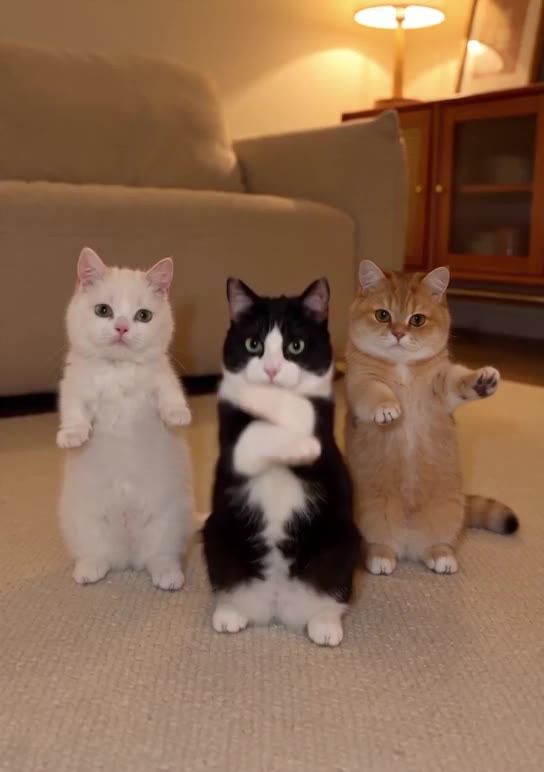
References steer edits as well as new shots. In this Morph edit, the words cite three cats’ character sheets, a living room and its floor plan by name, and the clip keeps its dance while the cats and the room change.
 Original
 With Morph
Change the background to @livingroom, laid out as in @floorplan, but swap the 3 cats for @yickshuncat, @oreo and @mango.
This is video to video with references rather than reference to video, since the motion comes from a real clip. The references do the same job in both: they say who and what appears, and nothing else.
Ingredients, elements, subject reference: the same idea by other names
Each model maker names the feature its own way, and each sets its own limit on pictures. What their official pages said when we read them:
| The maker’s name | What it takes | |
|---|---|---|
| Veo 3.1 (Google) | Ingredients to video | Up to 3 reference images of a character, object or scene |
| Kling (Video 3.0 Omni and O1) | Elements | An element is 2 to 4 pictures of one subject; up to 7 images or elements in one generation, or 4 when a video is also given |
| Vidu Q2 | Reference to video | 1 to 7 pictures (1 to 3 on Vidu 2.0) |
| Seedance 2.0 | Multimodal reference | Up to 9 images, 3 video clips and 3 audio clips |
| MiniMax S2V-01 | Subject reference | One picture of a person’s face |
What people use reference to video for
- Short films and series in which the same characters appear in every scene.
- Product ads: one product photo, many shots of it in use, its label kept.
- Mascots and brand characters that must look the same in every post.
- Putting a pet, a toy or a drawn character into new scenes.
- Keeping one location, a shop or a flat, through all the shots that happen there.
- Storyboards that move, with the cast already looking as cast.
Where reference to video breaks
- Copy and paste: the reference’s pose, background or light comes through whole, so every shot looks like the photo. A plain background and even light help.
- Mixed-up subjects: two people of similar build and coloring can trade faces or clothes. Make them different, and cite each by name where it acts.
- Fine detail: small text on a label, a logo’s letters and patterned fabric are kept less well than shapes and colors.
- Unseen sides: a reference of a face from the front leaves the back of the head to the model. A sheet with several views gives it more to keep.
- Too many pictures: each model takes only so many on a clip, and past that some are left out.
- Drift over time: a long or busy shot can still lose a detail, a failure of temporal consistency.
Why doesn’t my character look like my reference? Usually the picture shows too much at once: a small face, harsh light, other people or a busy background. Use a sharp picture of the subject alone, keep the prompt from describing their looks again, and keep the shot short.
Reference pictures of real people: consent and the rules
A reference of a real person can put that person in a scene they were never in. Use your own face, or someone’s who has said yes to this use, and label a video that could be taken for real footage.
- DreamBench’s Terms ask for informed permission before a real person’s likeness or voice is depicted with AI, and prohibit unauthorized real-person depictions, impersonation and false endorsements.
- Every uploaded picture is checked before any credits are used: nudity, gore and self-harm are refused, and so is a photorealistic person who appears to be under 18.
- Seedance doesn’t accept real human faces. A reference that shows one is refused, and DreamBench says so and suggests another video model for those scenes.
- Model makers set rules of their own: MiniMax’s subject reference, for one, takes a single picture of a person’s face.
Which video models on DreamBench take reference pictures
Every video model on DreamBench uses your references. On four of them, the pictures go to the video model with each clip. On the rest, an image model first draws the clip’s opening still from them, and the video model animates that still:
| Pictures on one clip | How they reach the clip | |
|---|---|---|
| Seedance 2.5 | Up to 30 | With the clip itself; one slot can hold the clip’s opening still |
| Seedance 2.0 | Up to 9 | With the clip itself; one slot can hold the clip’s opening still |
| Veo 3.1 | Up to 3 | With the clip itself |
| Vidu Q2 | Up to 7 | With the clip itself: Vidu Q2 renders from references only |
| Kling 3.0, Wan, LTX-2.3, HappyHorse 1.1, Grok Imagine 1.5, MiniMax H3 | Up to 6, through the opening still | An image model draws the opening still from them; the clip is then image to video |
When a clip’s model takes fewer pictures than its scene has, your own uploads are kept first. Seedance 2.5 takes the most; Veo 3.1 the fewest, so a scene with many people and props fits better on Seedance, if none of them is a real face.
How DreamBench uses reference pictures
In the composer you describe the film and add up to 8 reference pictures. Each gets a name and a tag: character, creature, location or prop. The name becomes its handle, so the brief can cite it, as in “@mia opens the box and lifts out @lamp”; typing @ in the brief lists the handles.
DreamBench then draws a reference sheet for every character, place and prop the film needs. A sheet made from your picture is drawn of the exact subject it shows, and a picture whose name says it is a sheet is used as it is.
- A character sheet: the face close up, the whole body from the front and back, and a three-quarter view, the same face in every panel, on plain gray.
- A prop sheet: the object from the front and at three-quarters.
- A location sheet: the place alone, empty of people and props, so none of them is copied from it.
Each clip carries the sheets of what is in it, and DreamBench writes the shot prompts that cite them. In Edit Scenes, each scene shows its references: remove one, add another of the film’s sheets or upload your own, up to as many as that scene’s model takes.
You can start from a tool too. After the product photo to video tool makes a clip, Continue as a story opens the composer with your photo as a @product reference and a brief that cites it.
The first 4 reference pictures are in a video’s base price, and each one past them adds the price of the sheet it needs. A sheet you pick from an earlier film adds nothing, since it is used as it is. The composer shows the total in credits before you generate.
Questions
What does R2V mean?
R2V is short for reference to video: generating a new video shot from a prompt and reference pictures of a character, object or place. T2V, text to video, and I2V, image to video, name the other common modes.
What is the difference between image to video and reference to video?
In image to video your picture becomes the first frame, so the clip opens on it exactly. In reference to video no picture is a frame: the model keeps the subject’s looks and chooses a new framing, pose and action, so the same person can appear in a wide shot and a close-up.
What is ingredients to video in Veo?
Ingredients to video is Google’s name for reference to video on Veo 3.1. Google’s announcement of October 2025 says you can give up to 3 reference images of a character, object or scene to guide a generation, for example to keep a character the same across shots.
What are elements in Kling AI?
Elements are Kling’s saved references: an element holds 2 to 4 pictures of one subject, a main one and up to 3 more, and a prompt cites it with @. Kling’s guide allows up to 7 images or elements in one Video 3.0 Omni or O1 generation, or 4 when a video is also given.
How many reference images can I use?
It depends on the model: Veo 3.1 takes up to 3, Vidu Q2 up to 7 and Seedance 2.0 up to 9, by their makers’ pages. On DreamBench a film takes up to 8 of your own pictures, and each clip carries as many as its model takes, up to 30 on Seedance 2.5.
Can I use a photo of myself as a reference?
Yes, on models that accept real faces. Seedance doesn’t: it refuses a reference that shows a real human face, so on DreamBench such scenes need another video model. Use only faces you have permission to use, and a photo of someone under 18 is refused.
Why does my video copy the background of my reference photo?
The model weighs the whole picture, so a strong background, pose or light can come through as if it were part of the subject. Use a picture of the subject alone on a plain background, and describe the setting in the prompt or give it its own location reference.
Can I keep the same character in several shots?
Yes. That is what references are most used for: the same pictures go in with every shot, so the face and clothes hold across cuts. On DreamBench each character gets a sheet with several views, and every clip the character is in carries it.
What makes a good reference image?
One subject, sharp and evenly lit, large in frame, on a plain background, with nothing covering it. For a person, a clear face and a second picture of the whole body help; for a product, a front-on view with the label readable.
Can a reference be a product or a logo?
Yes. Tag it as a prop and cite it in the prompt where it appears. Shapes and colors are kept best; small text on a label and a logo’s letters are where errors show first, so check them before you use a clip.
Can I use a reference picture for the location?
Yes. A picture of a place, tagged as a location, keeps its layout and materials across shots. Use the place empty of people and products, so nothing standing in it is copied into the scene.
Does using reference pictures cost more?
On DreamBench the first 4 reference pictures are in a video’s base price, and each one past them adds the price of the sheet it needs; a sheet picked from an earlier film adds nothing. You create a free account and choose a plan before the first video, and the composer shows the total before you generate.
Related
DreamBench tools
Model pages
- Seedance 2.5Tell a short story in one clip of up to 30 seconds, cut into linked shots, with sound made with the picture.
- Seedance 2.0Follow characters through dialogue and action in clips of up to 15 seconds, guided by reference images.
- Veo 3.1Shape realistic widescreen or vertical scenes with dialogue and sound, on Veo 3.1, Fast or Lite.
- Vidu Q2Bring a cast of characters into one scene from their reference images, in clips of up to 10 seconds.
- Kling 3.0Make movement the focus, from sport and dance to vehicles, with lip-synced dialogue in 5 languages.
Terms
- Image to videoAI video that starts from a still picture, the motion generated from a prompt.
- Text to videoAI that turns a written prompt into a video clip, every frame invented from the words.
- Temporal consistencyHow well an AI video keeps things the same from frame to frame, without flicker or drift.
- First and last frameAI video that opens on one picture and ends on another, with the motion between them generated.
- Character consistencyKeeping a character recognizably the same person in every shot of an AI video, not just within one clip.
Sources
- VACE: All-in-One Video Creation and EditingarXiv, read on
- Phantom: Subject-consistent video generation via cross-modal alignmentarXiv, read on
- Introducing Veo 3.1 and new creative capabilities in the Gemini APIGoogle, read on
- Kling Element Library User GuideKling AI, read on
- Vidu API documentation: reference to videoVidu, read on
- Seedance 2.0: Advancing Video Generation for World ComplexityarXiv, read on
- MiniMax API reference: subject-reference to video generationMiniMax, read on
DreamBench is an independent platform and isn’t affiliated with or endorsed by the companies named on this page.